|
Setup for Synchronet release
Step 1: Run SCFG by selecting BBS ->
Configure in the Synchronet console, and then do the following:
-
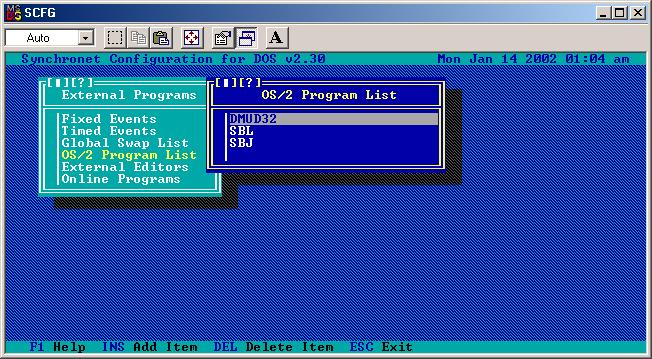
In SCFG, select
External Programs -> OS/2 Program List and hit the
insert key on your keyboard. Type "DMUD32" and
then hit enter. Select "No" for the "Comm
Port" toggle. (DO NOT SKIP THIS STEP! You need to do this so that Synchronet properly recognizes DoorMUD as a 32-bit door)
-
Then, go to External Programs -> Online Programs ->
Games -> Available Online Programs and hit the insert
key. Use "DoorMUD" for the program name and
internal code. Now, configure DoorMUD as follows:

Be sure to set the "start-up directory" to whatever
directory you put your DoorMUD files in.
When selecting the Synchronet XTRN.DAT dropfile type, set
"use real names" to "no" in order for inter-node
paging to properly display a user's alias.
After this step has been completed, exit SCFG.
Step 2: Refresh the board's node/config data by hitting the stop button on the telnet server, then hit the play button to turn the telnet server back on. You must do this in order for DoorMUD to be immediately visible on your board's game menu.
Step 3: Log on to your BBS with a Sysop account and enter the door. The first time the Sysop (security level 90+ in Synchronet) enters the door, you will be prompted for your real name. This is needed for registration purposes. After doing this, the game is now completely set up and ready for your users to play.
Please note that there is no "local mode" for the Synchronet version of DoorMUD. To play locally, use a telnet client to log onto your BBS, and play from your
BBS account.
|